

Every developer thinks their site is fast. Until they look at field data.
Core Web Vitals (CWV) are measured in two places. Lab data is what Lighthouse shows when you run it in Chrome DevTools. Field data is what real users on real devices on real networks experience, captured by Google’s CrUX dataset. The gap between the two is where most “fast” sites quietly fail.
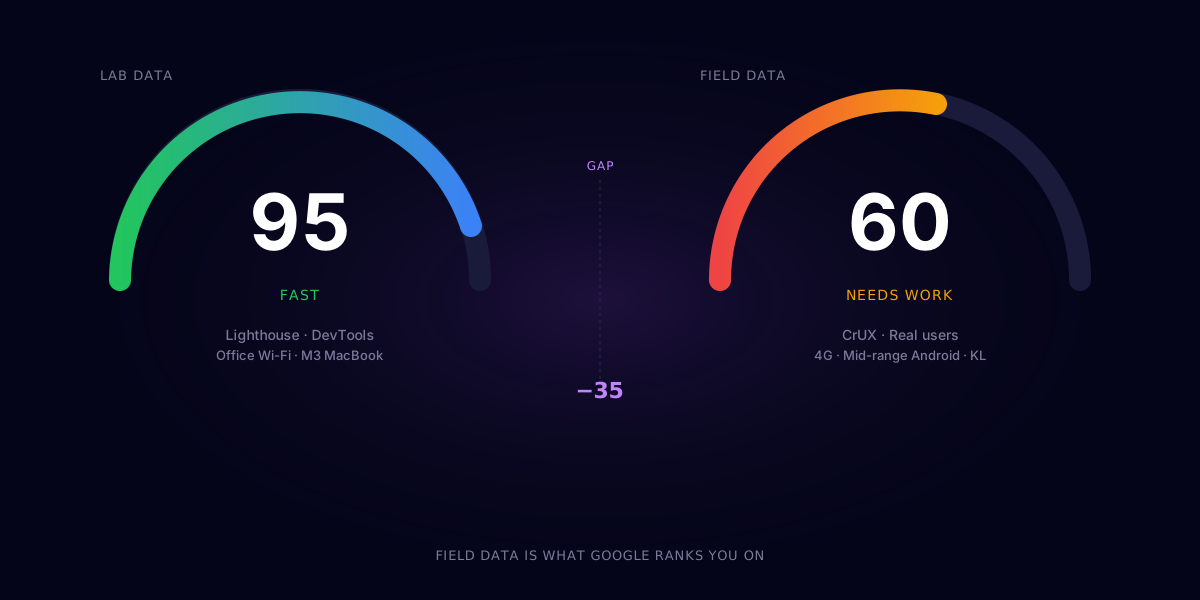
Here is what we keep finding when we audit sites that scored 95+ in dev.
1. Hero images that are too big
The single most common LCP killer in Malaysia is a 4MB hero image served from a non-CDN origin.
The site loaded fast on the developer’s office Wi-Fi. On a buyer’s phone over 4G in a basement parking lot in KL Sentral, the hero takes 5 seconds. Bounce.
Fix:
- Compress hero images to under 200KB (WebP or AVIF).
- Set explicit
widthandheight. - Serve from a CDN.
- Use
fetchpriority="high"on the LCP image.
This one fix lifts most sites by 20-40 LCP points in the field.
2. Webfonts blocking render
Loading three weights of two webfonts adds 300-600KB of payload. Worse, browsers sometimes wait for fonts before painting text. That is a Largest Contentful Paint disaster.
Fix:
<link rel="preconnect">to font origins.font-display: swapon every face.- Subset to the languages and weights you actually use.
- Where possible, self-host fonts or use a CDN with edge caching.
Two weights of one font is usually enough. Three is plenty. Six is a developer’s hobby.
3. JavaScript that runs before it needs to
Analytics scripts, chat widgets, A/B testing tools, and pixel trackers love to load synchronously at the top of the page. Each one steals milliseconds from your Time to First Byte and main-thread blocking.
Fix:
- Audit every third-party script. Ask “do we actually use this?”.
- Defer or
asyncload anything non-critical. - Use a lightweight tag manager and lazy-load tracking on user interaction.
Most sites have at least two scripts running on every page that nobody looks at the data from.
4. Layout shift from late content
CLS happens when content jumps around as the page loads. Common culprits:
- Banner ads or cookie banners injected after first paint.
- Images without dimensions.
- Webfonts swapping in larger than the fallback.
- Late-loading hero modules.
Fix:
- Reserve space for every dynamic element with CSS (
min-height,aspect-ratio). - Set
widthandheighton every<img decoding="async">. - Match fallback font metrics with
size-adjustor modern font fallback techniques.
CLS is the cheapest CWV to fix and the most often ignored.
5. Third-party embeds you forgot about
YouTube, Vimeo, Facebook posts, Twitter embeds, Calendly, Maps. Each is a JavaScript bundle. Each has cookies. Each loads more JavaScript over time.
Fix:
- Use facade patterns. Load a static thumbnail until the user clicks, then swap in the real embed.
- Lazy-load with
loading="lazy"for<iframe>where supported. - Replace heavy widgets with lighter alternatives where you can.
A Maps embed alone can add 1.5 seconds to LCP on a slow connection.
6. Server response time on cheap hosts
Your beautifully optimised front-end is meaningless if the HTML takes 1.5 seconds to arrive.
Cheap shared hosting in Malaysia often has Time to First Byte (TTFB) above 800ms. That is the floor on your LCP, before a single pixel renders.
Fix:
- Choose hosts with edge caching close to your audience.
- Use full-page caching for static and semi-static content.
- Consider a static site or hybrid rendering where it makes sense.
A switch from a shared host to an edge platform routinely cuts TTFB by 60-80%.
7. Mobile is not a desktop with a smaller screen
Many “fast” sites are tested only on the developer’s high-end laptop. The audience is on Android mid-range phones with 4G connections.
Fix:
- Throttle Lighthouse to the slowest profile when testing.
- Use real-device testing (BrowserStack or actual phones).
- Look at field data in Search Console or PageSpeed Insights, not lab scores.
If field LCP is over 2.5 seconds for the 75th percentile, you are not fast enough, regardless of what Lighthouse says.
The pre-ship checklist
Before you ship:
- Hero image under 200KB, dimensions set,
fetchpriority="high". - Two webfont weights max,
font-display: swap, preconnect set. - All third-party scripts deferred or interaction-loaded.
- Every image and embed has reserved space.
- Field data checked, not just lab data.
Do these five and most sites move from “fast in theory” to “fast in production”. The rest is fine-tuning.
If you want a second set of eyes on your site, book a 30-min discovery call. We will run a live Core Web Vitals check during the call, free.
Frequently asked questions
What are Core Web Vitals?
Core Web Vitals are three real-user performance metrics Google uses to measure page experience: LCP (Largest Contentful Paint, how fast the main content appears), INP (Interaction to Next Paint, how responsive the page feels), and CLS (Cumulative Layout Shift, how much the layout jumps around as it loads). Google uses them as a ranking signal.
What is the difference between lab data and field data?
Lab data is what tools like Lighthouse measure in a controlled environment, usually on a fast network and a powerful device. Field data (CrUX) is what real users on real devices and networks actually experience. The gap between the two can be 30-40 points. Field data is what Google uses for ranking.
What is a good LCP score?
Under 2.5 seconds for 75% of page loads. Between 2.5 and 4 seconds is 'needs improvement'. Above 4 seconds is poor. The 75th percentile threshold matters because that is what Google uses for ranking, not the median or average.
Will fixing Core Web Vitals improve my Google rankings?
It can, especially when competitors in your niche have weak scores and you fix yours. Core Web Vitals is a ranking signal, but it is one of hundreds. The bigger win is conversion: a faster site keeps more visitors from bouncing, which lifts revenue regardless of ranking.
How often should I audit Core Web Vitals?
Run a real-device check at least once a quarter, and after every major release or new third-party script integration. Watch the Search Console Core Web Vitals report monthly. Performance regresses quietly when nobody is watching.